I Built an MCP App to Own My AI Memory.
TLDR
I wanted to play around with MCP Apps and explore how they can serve as universal visualization layers across different AI surfaces. So I built a toy project called memory-mcp — a cross-LLM memory management MCP server that lets you store, search, and manage your memories across AI tools, with a slick interactive UI baked right in. This means that your memories are unified across all your AI clients (Claude, ChatGPT, Gemini, Cursor, VS Code, etc.) and you can access them from any surface without vendor lock-in. When you ask questions across the different surfaces, each surface can pool from your shared memory to get you the most relevant information. You can also easily manage exactly what data is stored and how it’s used. It’s a fun example of how MCP Apps / MCP servers can provide a consistent user experience across different platforms.
Introduction
I just built a thing:
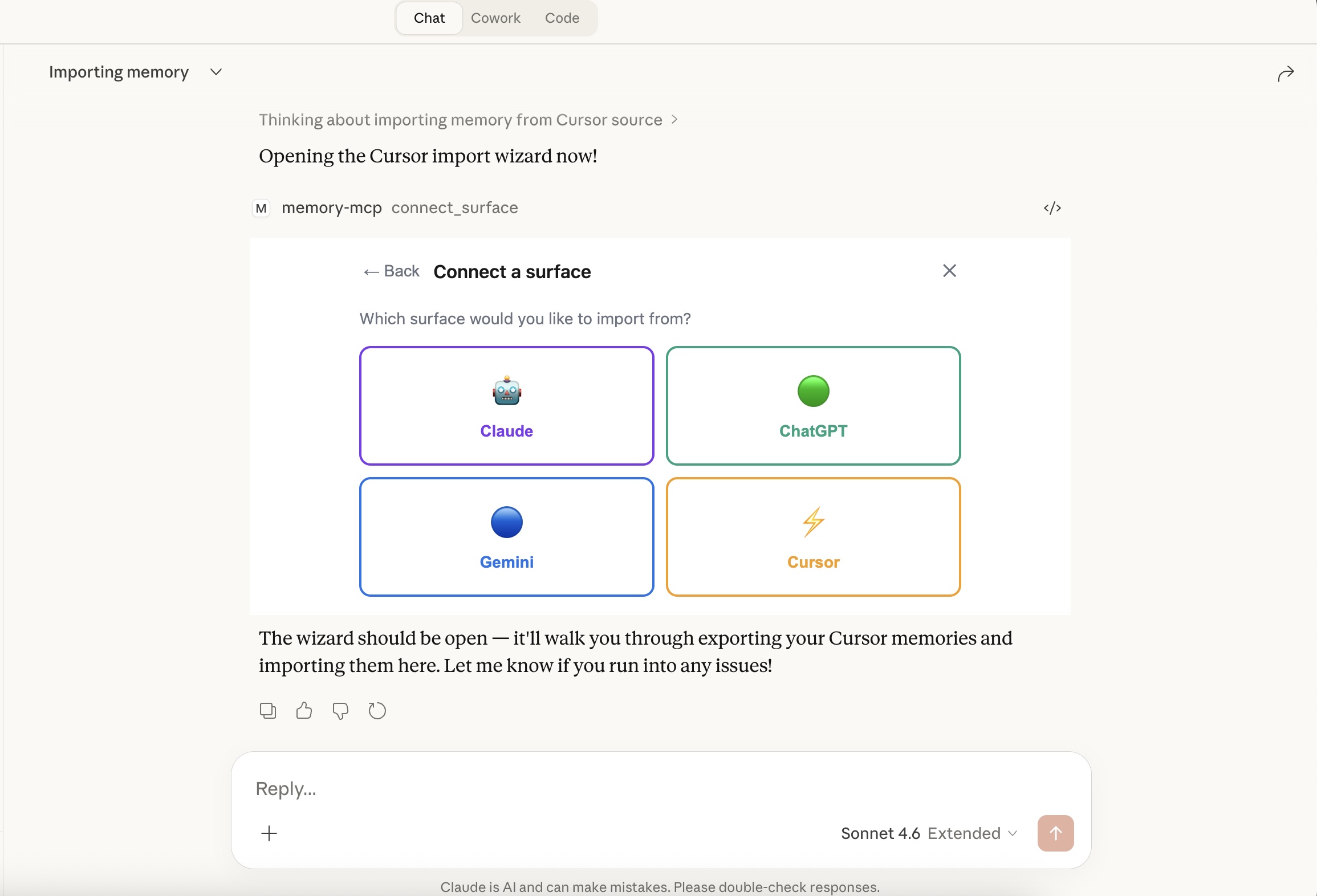
It looks something like that ^.
If you’ve been using AI tools for a while, you know the drill: you spend time in Claude, it learns things about you, then you switch to Cursor or ChatGPT for something else and it has no idea who you are. Which… frankly maybe is actually something we should be grateful for? But it also means your context is fragmented across every tool you use. It’s like having a bunch of different notebooks with different pieces of your life story, and none of them talk to each other.
My fiancée and I were taking my dog (photo below):

to the park and had a conversation about how consumers of LLM agents should have visability and ownership of their own data/memory that power these AI experiences. I thought about it for a bit and realized: hey, y’know, this may be a fun way to explore MCP Apps. A couple claude code prompts, some manual tweaks/experimenting later and here we are: memory-mcp — a cross-LLM memory management MCP server that lets you store, search, and manage your memories across AI tools, with a slick interactive UI (thanks MCP Apps!) baked right in:
The whole thing runs as an MCP server, which means you can plug it into Claude, VS Code, Cursor, or any MCP-compatible client. Your memories live in a local SQLite database that YOU own. No vendor holding your context hostage.
A quick note: I know there are companies already working hard on this exact problem — Mem0, Zep, Letta (formerly MemGPT), and others. This post isn’t a comparison to any of them, and this project is very much a toy example. What I was really exploring here is a different question: how do MCP Apps work as universal visualization layers across LLM surfaces? Memory management just turned out to be an extremely compelling use case to poke at that idea (something my fiancée was smart enough to recognize from the start).
What is an “MCP App”?
MCP (Model Context Protocol) is an open protocol that lets you extend AI tools with custom servers. This blog post isn’t about MCP as a whole, but the gist is: you run an MCP server that exposes a set of tools (like remember_this, recall_memories, etc.), and any AI client that supports the MCP protocol can call those tools during a conversation. It’s a way to build your own custom backend logic that multiple AI clients can tap into.
But the thing I was particularly interested in playing with is a relatively new feature of the protocol: MCP Apps. Instead of just exposing raw tools, an MCP App ships an interactive UI that renders right inside the AI client. Conversational agents can invoke a tool that returns a full HTML interface, and the user interacts with it without ever leaving the conversation. So you can build an actual visual interface that folks can access from a bunch of different compatible surfaces. Seemed pretty neat to me.
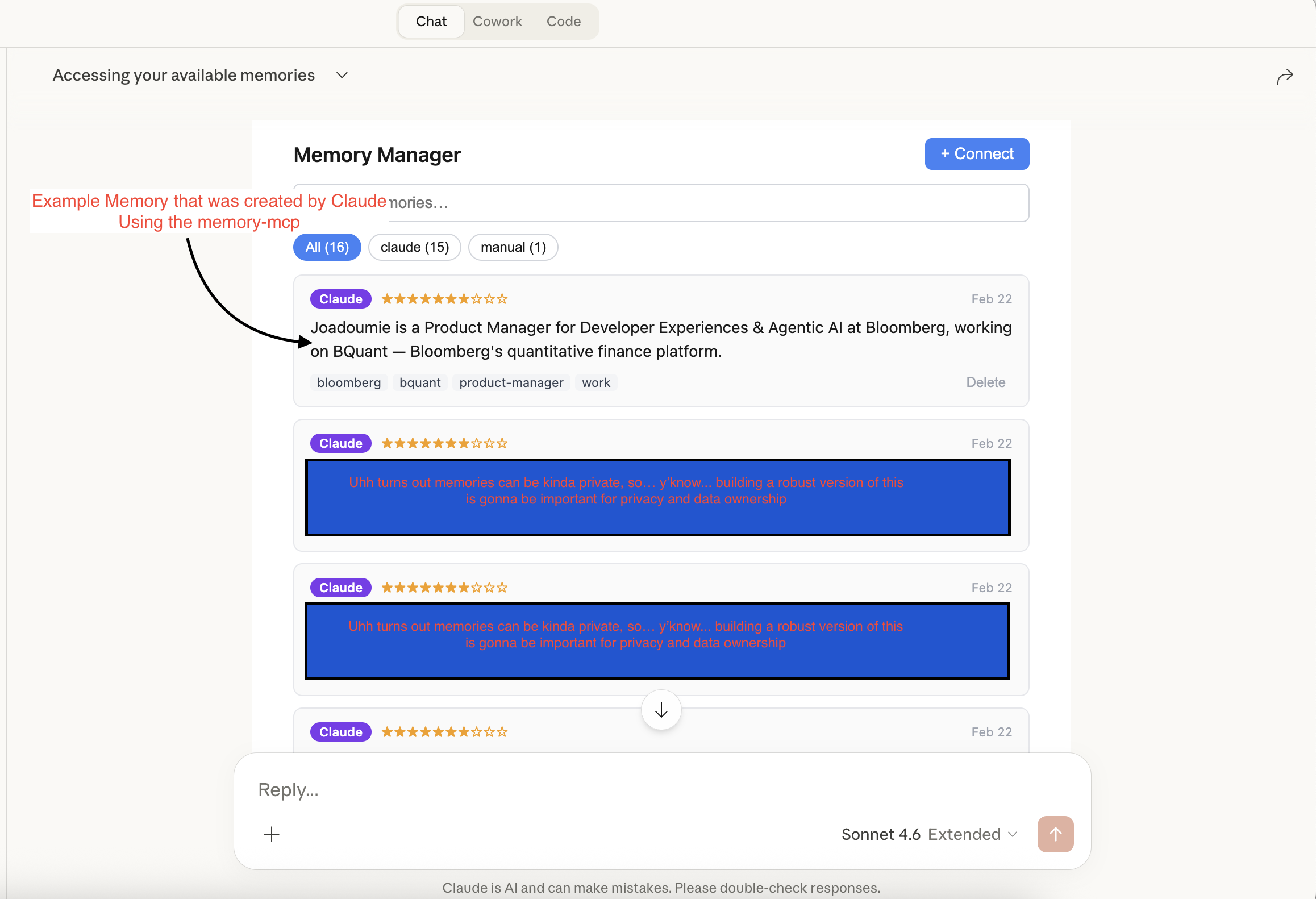
And so… that’s pretty much precisely what memory-mcp does. You ask Claude “what memories do I have?”, it calls recall_memories, and a fully interactive memory dashboard pops up in the chat:
You can search memories, see which AI surface they came from (tagged as claude, manual, etc.), rate their importance, and delete the ones that are stale. All without leaving the chat window.
The “Connect a Surface” Wizard
The other thing I wanted to tackle was import. If you’ve been using ChatGPT or Gemini for months, you have a ton of context trapped there. So I built a wizard that lets you pull those memories in:
You can import from Claude, ChatGPT, Gemini, or Cursor. Each source has its own export flow. For Gemini, for example, it walks you through downloading your data from Google Takeout and dropping the JSON file:
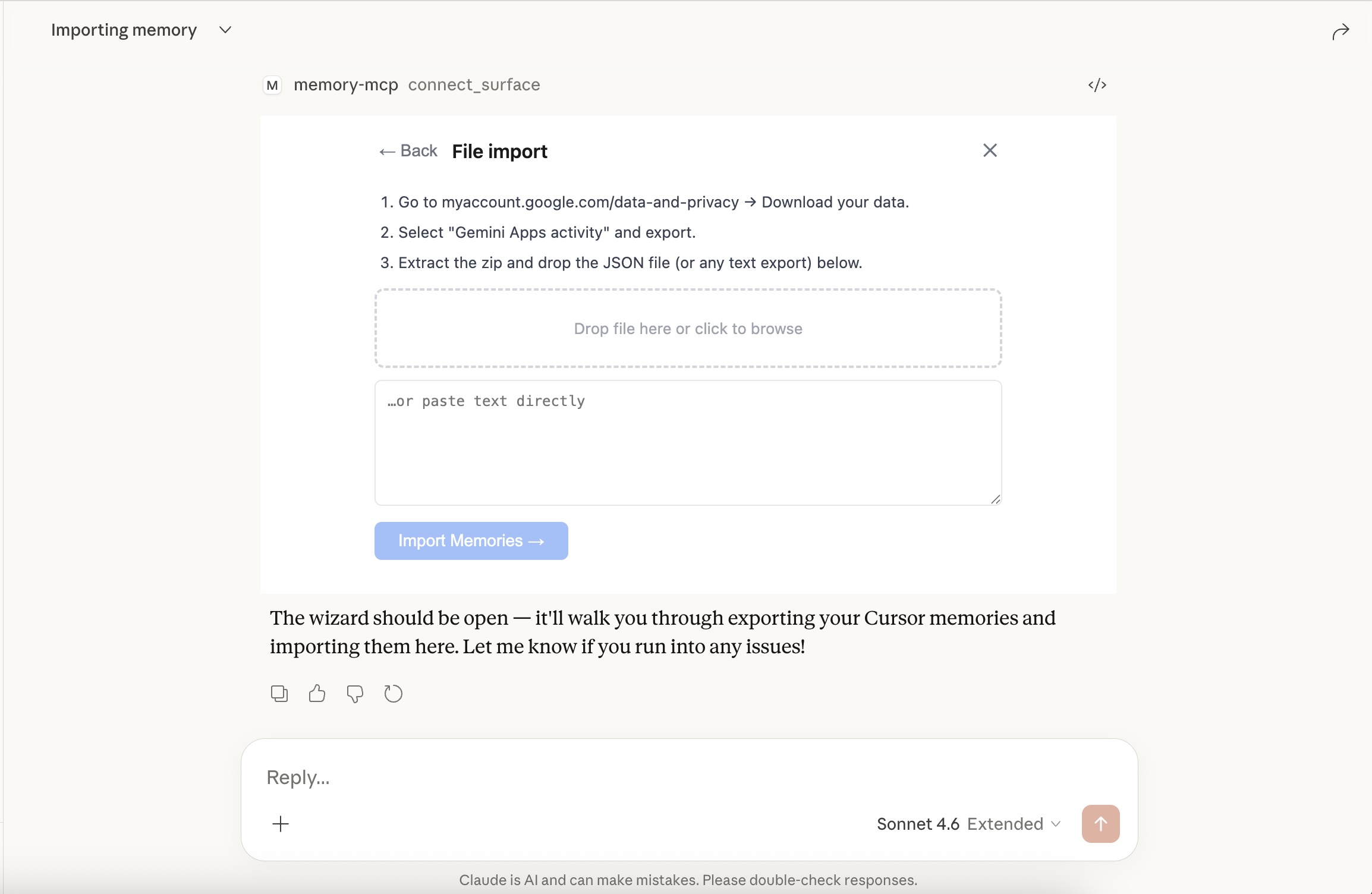
The server parses the export, extracts anything that looks like a user preference or persistent context, and stores it tagged with the source. You end up with a unified memory layer across all your AI tools.
It Works Everywhere
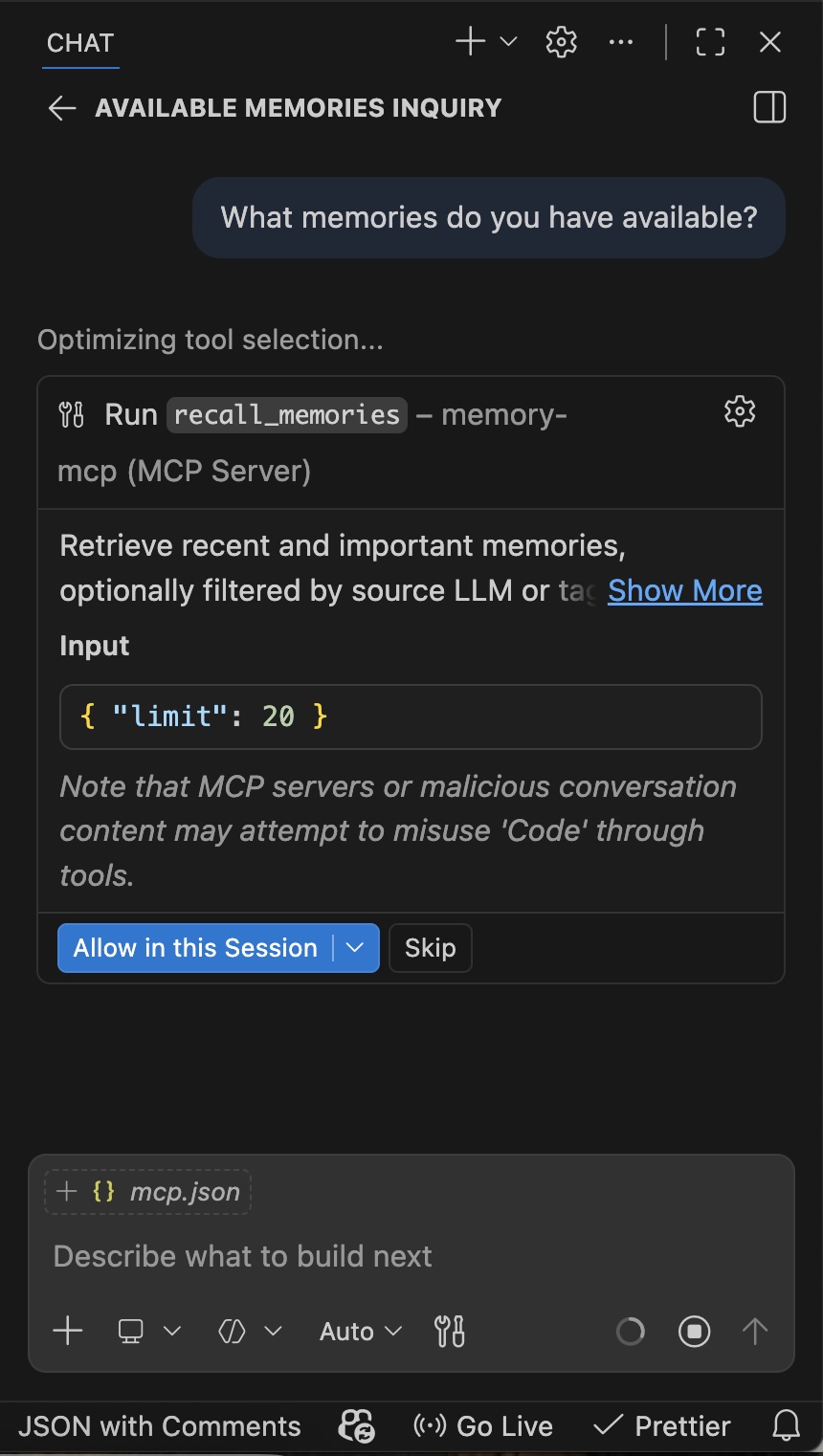
Because it’s an MCP server, it doesn’t care what client you’re running. Here it is inside VS Code — the AI calls recall_memories to pull context before answering:
And the memory dashboard renders just as well in VS Code’s chat panel:
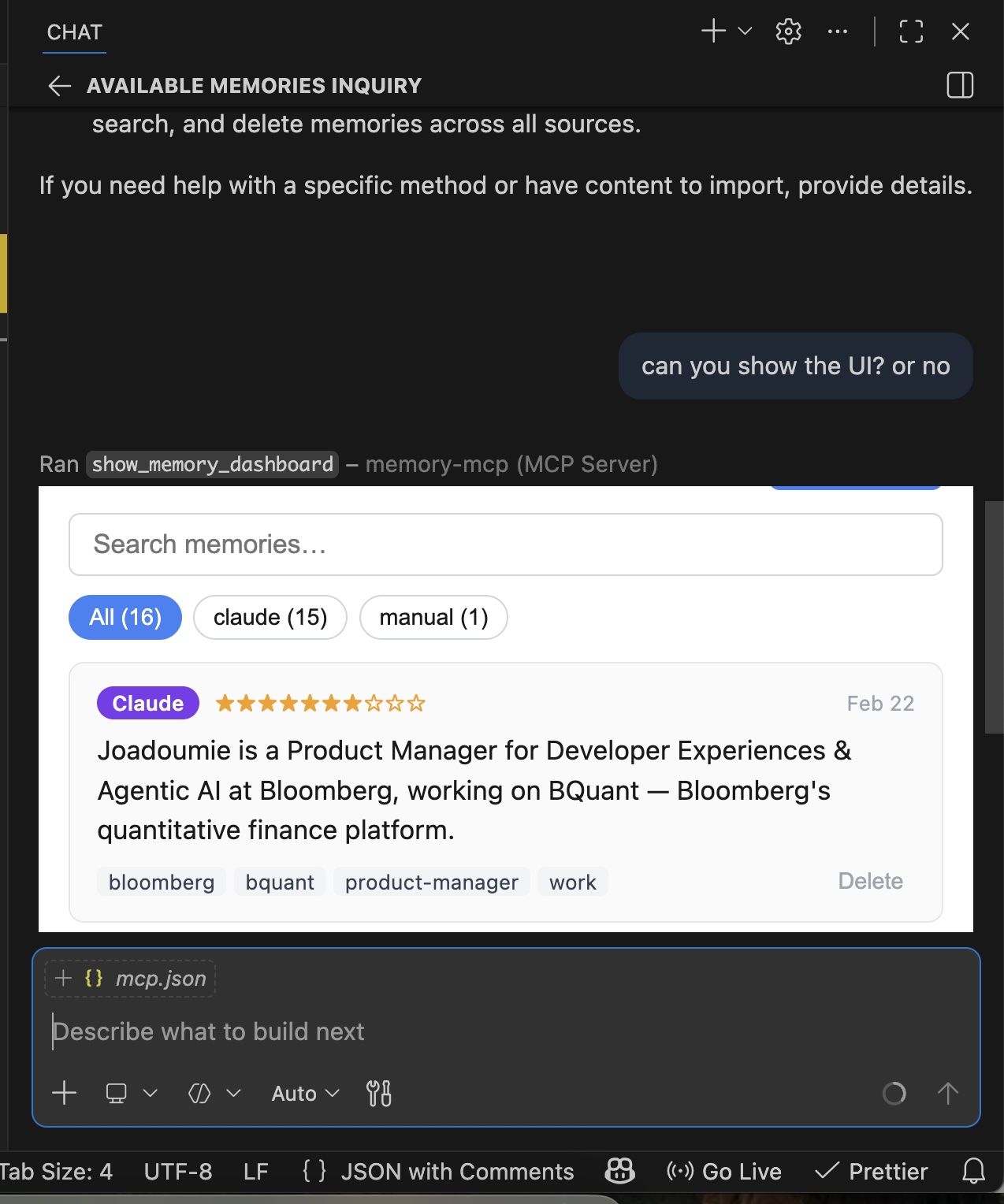
Same memories, same UI, totally different surface. That’s the whole point.
The Setup (And Then You’re Done)
Running memory-mcp is straightforward. Add it to your mcp.json for each client you want to connect:
{
  "mcpServers": {
    "memory-mcp": {
      "command": "npx",
      "args": ["-y", "memory-mcp"]
    }
  }
}
The server auto-creates a local SQLite database at ~/.local/share/memory-mcp/memories.db on first run. That database is the source of truth — every client you configure points to the same file.
Here’s what makes this nice: you don’t really have to think about it after that. Each surface (Claude, Cursor, VS Code Copilot, whatever) has access to remember_this, recall_memories, and search_memories as tools. When you’re in a session, the AI will naturally call recall_memories to pull relevant context, and remember_this whenever something worth keeping comes up in conversation. Because every client talks to the same database, a memory that Claude stores on Monday is available when Cursor picks it up on Wednesday — no manual sync, no copy-pasting context between tools.
The memories are tagged by source, so you always know where they came from:
| Source | Description |
|---|---|
claude |
Stored during a Claude.ai or Claude Code session |
chatgpt |
Imported from ChatGPT |
gemini |
Imported from Google Gemini |
cursor |
Stored or imported from Cursor |
manual |
Added directly via the CLI or dashboard |
From there, any MCP-compatible client will have access to the full tool surface: remember_this, recall_memories, search_memories, show_memory_dashboard, and connect_surface.
Conclusion - TLDR
TLDR – I built a toy thing. Is it cool? I think so. Is it production-ready? lol. The gist is: it’s a cross-LLM memory manager built as an MCP server with an interactive dashboard UI. It lets you unify your AI context across tools, and the whole thing is open source for anyone to play with. It’s a fun example of how MCP Apps can serve as universal visualization layers across different AI surfaces.
Check out the full source on GitHub if you want to poke around, contribute, or riff on the idea.